Building a Great Distributed Team From Sprint One
- Teamworx
- 10 Nov, 2023
- 02 Mins read
- Tips and Techniques
Ever heard the “Forming Norming Storming” theory that stipulates it takes time to build a great team? Park that. Here’s how to build a great team from Sprint One.
In this post, I share 4 team hacks to get your distributed team up and running from Sprint One!
- A “Team Manual” shared as an editable document
- An early check-in
- A timezone chart
- Scale up your Agile events only when necessary
Background
I’ve just finished my first week as Scrum Master for a brand new team, with core team members in different parts of Australia, New Zealand, working with a development partner in India. Here is the remote team building hack that achieves that achieves the following, in a short span of 30 mins:
- Tests connectivity to your collaboration tool and file shares.
- Forms a picture of someone’s role on the team.
- Helps get to know your team in a social context.
- Identifies communication styles.
- Builds empathy for individual needs.
The Team Manual
Never underestimate the power of a short team chartering activity. A “user manual” or “team manual” is what you would refer to if you needed the key to unlock communication with someone in your team.
Create a slide with coloured editable regions and save it where the team will be storing it’s files. For distributed teams, this could be MS Teams, Confluence, or Google Workspace.
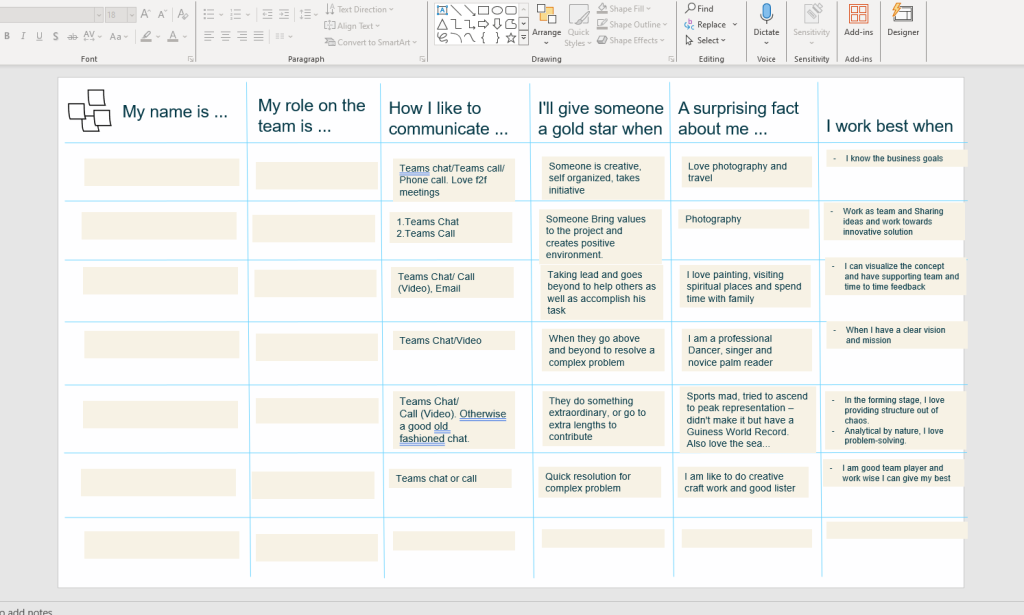
Create the headers:
- My name is
- My role on the team is
- How I like to communicate
- I’ll give someone a gold star when
- A surprising fact about me
- I work best when
Steps
- Schedule in a fun 30 minute icebreaker meeting, with instructions in the invitation for assessing the file share. Chances are that people would have tried to edit the file before the meeting, so you’ve earned bonus troubleshooting time.
- Start the meeting by getting everyone to post in the team’s communication channel. This is important because not everyone might be on the same teams tenant, and could be posting with a guest or external account. It’s important you do this so you know which account that team member uses.
- Give everyone a few minutes to fill in the table and shareback.
Check-in Early
Don’t wait until the retrospective to check-in on how we are working as a team. Do a lightweight retrospective at the end of week one. Even better, ask at a standup!
Timezone Chart
Build a timezone chart and highlight overlapping hours. This helps teams understand when they can work synchronously and when asynchronous communication is needed.
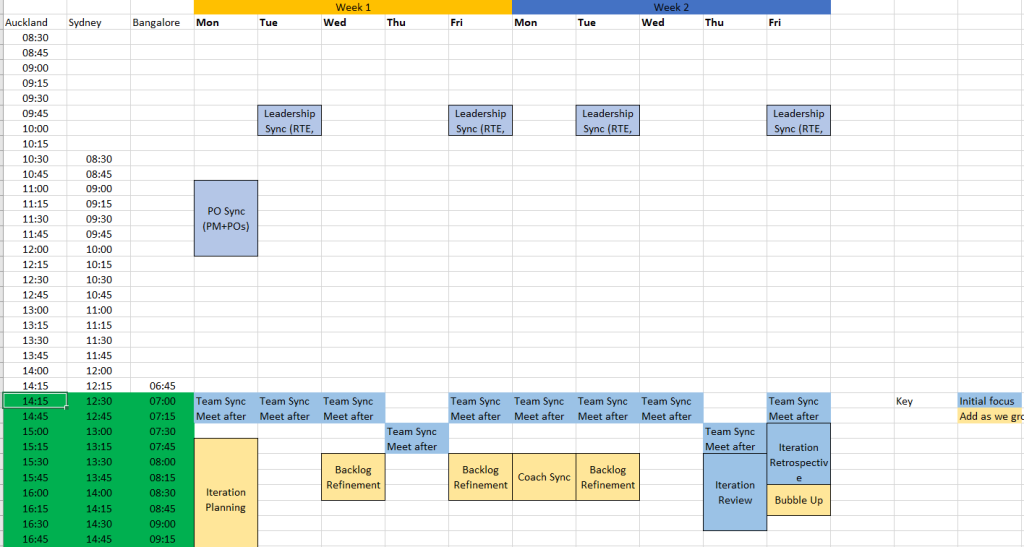
Keep It Simple – Scale Up Only When Necessary
Don’t rush to book in all your Agile events at once. Scale only when necessary.
I hope these four team building “hacks” get your distributed team up and performing from Sprint One!
Stop "doing" process. Start delivering results.
Get in touch nowSee how we can help fine tune your business.